Translations
Not a setting: how to fix or add a translation of the POS, the plugin or these docs.
WCPOS is translated by AI, and a person checks every batch before it ships. People who use WCPOS in their own language catch what the machine misses. If a word in the POS, the plugin or these docs reads wrong, you can fix it: you change one line on GitHub and open a pull request. You don't need to be a developer.
Jump to: Fix the POS or the plugin · Fix these docs · Add a language
See it in your language
Find the word on the screen where it's used before you change it. The POS opens in your store's language, the Site Language set in WordPress. To try another language on one device, open Settings from the menu, then General.
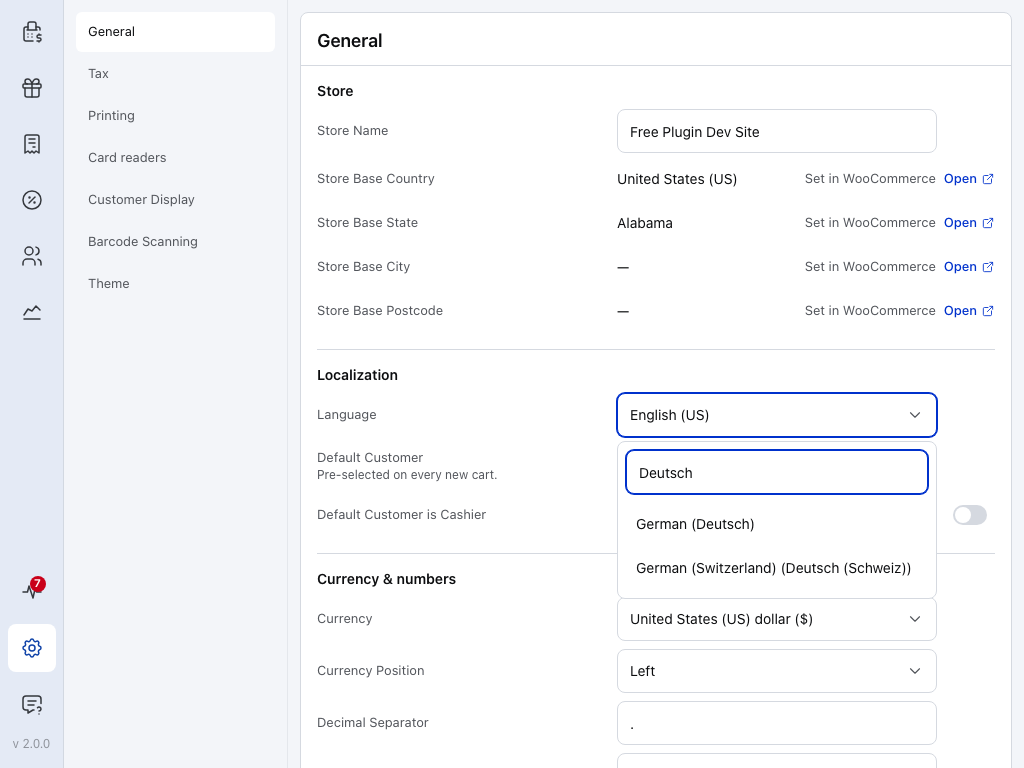
- Settings — near the foot of the menu.
- General — the first page of Settings.
- Language — the language the POS shows on this device. Tap it to open the list. See Language.
Type in the list's search to find your language, then tap it:
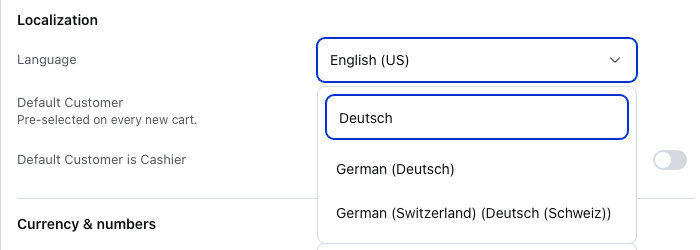
- Search — type a language's name in English or in that language: Deutsch finds German.
- German (Deutsch) — tap a language to switch to it. Each one shows its own name after the English one.
- German (Switzerland) — a regional version sits next to the main one. Pick the one your shop uses.
The change stays on this device. Your store and your other devices keep their own language. To go back to your store's language, press Restore server settings at the foot of the same page: it also puts back the currency and number format your store sends. The plugin's WP Admin screens follow your language in WordPress instead.
Fix a word in the POS or the plugin
Every app and plugin translation lives in wcpos/translations.
-
Find the file for your language and the part of WCPOS you're fixing. For German, the POS text is in German POS:
core.jsonand the plugin's PHP text is in German plugin:woocommerce-pos-de_DE.po. Which file holds what, below, lists every folder. -
Find the words. Search the file for the words you saw on screen: press Ctrl+F, or ⌘F on a Mac. In a JSON file the translation follows its key. In a PO file it's the
msgstrline under the Englishmsgid. Check the key or the English matches the place you saw it. -
Change the translated text only. Leave the key, the
msgidand every placeholder such as{name},%s,%dor<strong>exactly as they are.In a JSON file, each entry is a key, a colon, then the translation. Here the English is
Delete {name}, and German puts the verb last:Before"coupons.delete":"Löschen {name}",After"coupons.delete":"{name} löschen",Only the German words changed. The key,
"coupons.delete", and{name}stay as they are.In a PO file,
msgidis the English andmsgstris your language:msgid "Copy of %s"msgstr "Kopie von %s"Change only the words in the
msgstrline. Leave themsgidline and%sas they are. -
Send it as a pull request. See Send your fix on GitHub.
Which file holds what
| Folder | What it holds |
|---|---|
source/ | The English text, collected automatically. Don't edit it. |
translations/js/<locale>/monorepo/ | The POS the cashier uses: buttons, cart, checkout, dialogs, errors. |
translations/js/<locale>/electron/ | The desktop app's own window and menus, for Windows and macOS. |
translations/js/<locale>/woocommerce-pos/ | The free plugin's WP Admin screens, such as Settings and Templates, one file per screen. |
translations/js/<locale>/woocommerce-pos-pro/ | The Pro plugin's WP Admin screens, such as the Stores editor and Pro settings. |
translations/php/<locale>/ | The plugin's PHP text. Edit the .po file only. The .mo and .l10n.php files beside it are rebuilt from it by the repository's scripts, so a check on your pull request may say the .mo is stale. Say in the pull request that you changed the .po only. |
Many languages have a base folder and regional ones, such as de and de_DE, de_AT. The POS reads the regional folder its language points to: German (Deutsch) reads de_DE. The base folders de, en, es, fr, nl, pt and zh are copied from their main regional folder (de from de_DE) at every release, so make your fix in the regional folder: a change made only in a base folder is overwritten.
If your language isn't there, see Add a language.
Fix a page of these docs
Every language has its own copy of each page in wcpos/docs.
-
Find the file. Edit this page at the bottom of a page opens the English file on GitHub. In its path, swap
versioned_docs/fori18n/<locale>/docusaurus-plugin-content-docs/, with your language code as<locale>:defor German. The rest of the path stays the same, as in this page's 1.x version in German.Find another page or language
These docs use Docusaurus. The English pages live in
versioned_docs/, in a folder for each version. Each language has its own copy underi18n/<locale>/docusaurus-plugin-content-docs/, in a folder for the same version, with the same path as the English page. The codes are listed under Language codes.For French, the English file
versioned_docs/version-2.x/support/translations.mdxbecomesi18n/fr/docusaurus-plugin-content-docs/version-2.x/support/translations.mdx. Browse the French folder to see what's there. -
Change the words. Keep Markdown and MDX syntax, links, code and the frontmatter keys as they are. Translate the text, the headings and the labels a reader sees.
-
Send it as a pull request. Change only the file under
i18n/<locale>/, never the English page. See Send your fix on GitHub.
For anything bigger, a whole section or a new language, open an issue first so we can plan it together.
Send your fix on GitHub
You need a free GitHub account. You don't need to install anything: it all happens in your browser.
- Sign in to GitHub and open the file you want to fix.
- Press the pencil, Edit this file, at the top right of the file. The first time, GitHub asks you to fork the repository: press Fork this repository. That gives you your own copy to change.
- Make your change in the editor.
- Press Commit changes… above the editor. A box opens.
- Say what you fixed in one line in the box's message field, then press Propose changes.
- Press Create pull request on the next page, then Create pull request again to send it.
A reviewer checks your change and merges it, or asks you about it on the pull request.
How a fix reaches people
A person reviews every change before it ships. A fix to these docs is published with the site after it's merged. A fix to the POS, the desktop app or the plugin reaches people with their next update.
The whole path, step by step
- The English text is collected. When the apps or the plugin change, their English strings go to the wcpos/translations repository. These docs keep theirs in wcpos/docs.
- AI fills in what's missing, in every language. It follows a rule set and a glossary for each language. A translation that breaks a placeholder or markup, or uses the old long product name, is rejected and tried again later.
- A person reviews the batch as a pull request and merges it.
- The fix ships. For these docs, the site is rebuilt from the merged pages and published. For the apps and the plugin, a merge makes a new translations release. The POS, the desktop app and the plugin each use a fixed release, so a fix reaches them in their next update. A fix to a
.pofile also needs its.l10n.phpfile rebuilt first, so it can take longer.
For the apps and the plugin, a daily check also opens an issue on wcpos/translations if anything is still missing.
So your part is rarely a blank file. It's a translation that's already there and reads wrong: a stiff phrase, a term that doesn't match what WooCommerce uses in your language, a label that doesn't fit its button.
WCPOS no longer takes translations through translate.wordpress.org. It doesn't allow machine translation, so most languages were never finished there. The plugin downloads its own translations from wcpos/translations. If you translated WCPOS there before, thank you: fixes now go to the places on this page.
Add a language
The apps and the plugin cover more than 50 languages and regional variants, listed in locales.json. These docs cover fewer, listed below. If yours is missing, open an issue on the repository you need, and we'll add it. The AI fills a new language in quickly. From there, people who speak it make it read well.
Language codes
Find your language code
These docs are published in:
| Code | Language |
|---|---|
ar | Arabic (right to left) |
de | German |
es | Spanish |
fr | French |
hi-IN | Hindi (India) |
it | Italian |
ja | Japanese |
ko | Korean |
nl | Dutch |
pt-BR | Portuguese (Brazil) |
zh-CN | Chinese (Simplified) |
The two repositories write codes differently. wcpos/translations uses an underscore, de_DE, pt_BR, zh_CN, and has base languages (de, fr, es) as well as regional ones (de_AT, fr_CA, es_MX). These docs use a hyphen, pt-BR, hi-IN, zh-CN. Use the form of the repository you're editing.
What a reviewer looks for
These are the rules the AI works to, so a reviewer checks your change against them too.
- Placeholders stay exactly as they are.
{name},%s,%dand tags such as<strong>are filled in or drawn by WCPOS. Translate around them. - Product names stay in English.
WCPOS,WCPOS Pro,WooCommerceandWordPressare never translated, and nor are other brand and platform names such as Stripe, PayPal, Square, Android, iOS, macOS and Windows. Write WCPOS in text people read. The old long name belongs only in slugs, file names and web addresses. - WooCommerce's words win. Store owners see WCPOS next to WooCommerce, so a word WooCommerce also uses, such as coupon, refund, tax or payment method, matches WooCommerce's own translation for your language. Where WooCommerce has no word, such as cashier, till or cash drawer, use the word in your language's glossary,
scripts/translation-glossary.json. - Keep it about as long as the English. A one-word button stays one or two words. POS screens have little room.
- Formal or informal follows your language's notes. Some languages have their own notes in
scripts/locale-context/in wcpos/translations, with the register, the decimal separator and common traps. German uses Sie, for example. - Code stays as it is. Coupon codes, gateway IDs, language codes, file paths and shortcodes are never translated. If you're not sure, leave it in English. One exception in these docs: a menu path in code style, such as
WP Admin > WooCommerce > Settings > Payments, uses the menu names WordPress and WooCommerce show in your language. Keep the>signs and the words WP Admin, WooCommerce and WCPOS. - Check it on the screen. A phrase that fits one screen can wrap on another. See See it in your language.
For a right-to-left language, such as Arabic, Hebrew, Persian or Urdu, receipts need a right-to-left template too. The gallery has them: see Customise your receipt and Non-Latin receipts.
Ask for help
- Discord — talk translations with us and other translators at wcpos.com/discord.
- GitHub issues — on wcpos/translations for the POS and the plugin, or on wcpos/docs for these docs.