PAYMENT521: The order was closed, so the payment wasn't recorded
What this means
The store had already closed the order, so a payment taken at the till was not recorded.
The till took a manual payment (cash, or a card run on a separate machine), but the store had already cancelled, trashed or refunded the order and refused to record it. The message on screen reads "The store had already closed order #…, so this … payment was not recorded. Return the money or reopen the order in WooCommerce."
Your data
Money moved, and your store did not record it. Nothing was stored on the order. The payment stays under … sale needs attention in Orders until you press Handled on its row.
Troubleshoot
At the till
Take no new money from the customer: you already hold this payment.
- Check the amount and method taken at the till: the row under … sale needs attention in Orders repeats the message, and the same entry is in Store health → Logs.
- If the sale should not go ahead, give that payment back the way it was taken: cash from the drawer, or a refund of that charge on the card machine. Do not record a paid out for cash handed back — the refused payment was never counted in the drawer's expected cash.
- If the sale should go ahead, ask your site administrator to reopen the order (see On the store). Then record the payment again from the money you already hold, with the same method you used the first time.
- Once the money is settled, press Handled on the row in Orders.
On the store
For the site administrator.
- If the sale should go ahead, reopen the order in WooCommerce, for example by setting it back to Pending payment, so the till can record the payment again.
- If this happens repeatedly, orders are being cancelled or refunded elsewhere while they are open on a till.
Find the entry in the log
Every code is logged in Store health → Logs. Press Errors, then tap the entry with this code to open it under its row. The picture shows an example entry, AUTH201; on your till the entry shows this page's code.
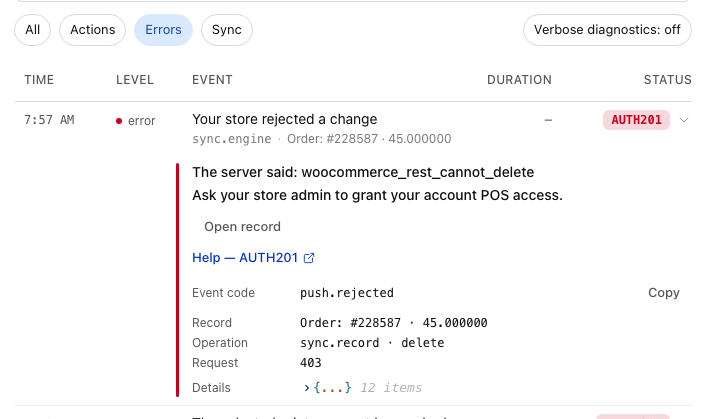
- Errors — the filter that's on.
- The entry — the code in Status is its error code.
- What happened and what to do — what your store said, when it said something, then one line on what to do. When it matters, a warning comes first, such as Payment has been taken — don't charge again. or Don't clear this device's data.
- Help — opens the code's page in these docs.
- Open record — opens the order, product or customer the entry is about, when this till has it, your store has WCPOS Pro, and you're allowed to edit it.
- Copy — copies the whole entry for support. The rows under it are for support; you don't need to read them.