Contact Support
Stuck on something these pages don't answer? Ask in the WCPOS Discord, right from the POS. This page shows where to ask, and what to send so someone can help you the first time.
- Check the common problems first. Many answers are a search away.
- Copy your debug info from Store health → Logs.
- Post in Discord with the debug info and what happened.
For licences, billing or anything private, email support instead.
Ask from the POS
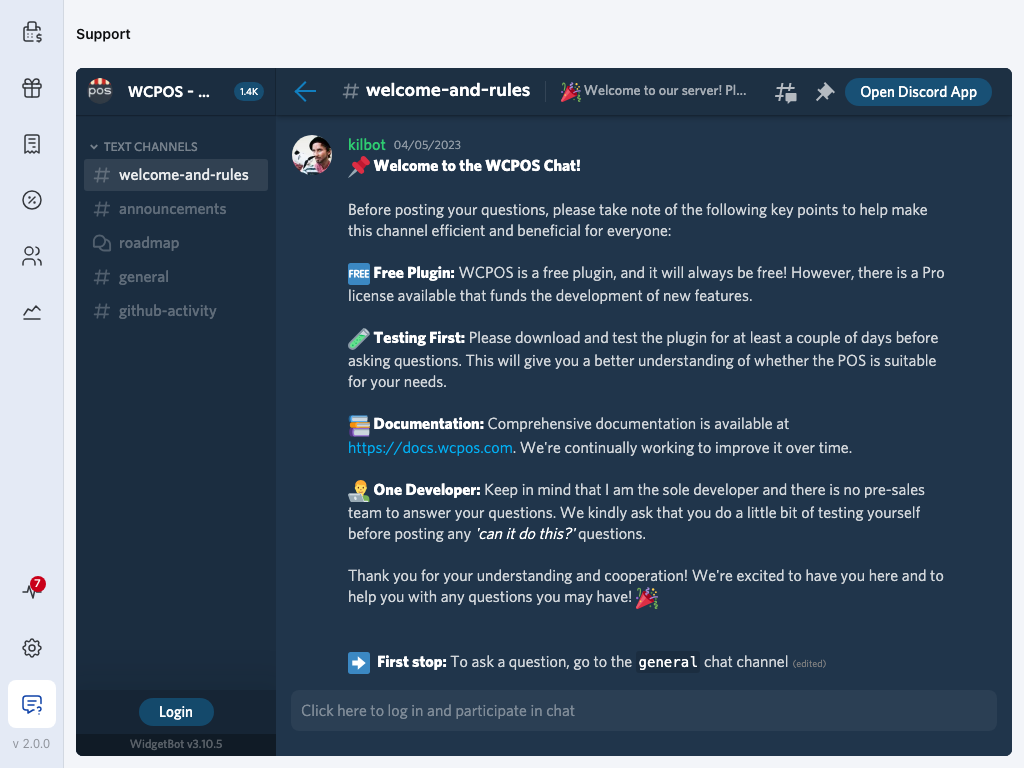
First, copy your debug info. Then press Support at the foot of the menu. The WCPOS Discord opens inside the POS, so you can read what others asked and post your own question without leaving the till. Choose general, then press Login to sign in and post your question.
- Support — the speech bubble at the foot of the menu. On a phone, open the menu first.
- Support — the WCPOS Discord, inside the POS. It opens on welcome-and-rules.
- The Discord — pick a channel on the left. Ask your question in general. Press Login to sign in to Discord and post.
- Store health — a red number here counts new errors since you last opened Logs. Those are what to send with your question.
On a phone, open the menu from the top corner. Support is the last item, with its name beside it.
Find Support on a phone
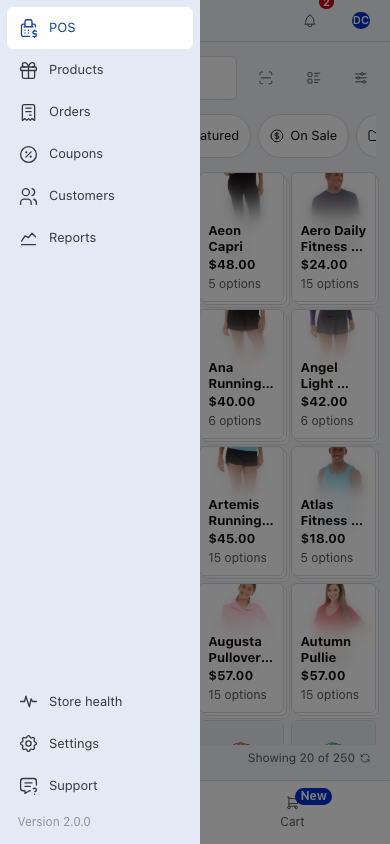
- Store health — Database, Performance and Logs.
- Settings — the POS settings.
- Support — the WCPOS Discord.
Discord channels
| Channel | What it's for |
|---|---|
| welcome-and-rules | How the server works. Read it first. |
| announcements | New versions and news. |
| roadmap | A forum of what's planned. |
| general | Questions and answers. Ask here. |
| github-activity | Changes to the code as they happen. |
Away from the till, the same server is at wcpos.com/discord, or press Open Discord App in the top corner of the Support screen.
Send what we need
Most questions are answered faster with the versions you run and the errors the POS has seen. The POS gathers both for you.
Open Store health in the menu, then Logs, and press Copy debug info: it goes to your clipboard. In the iOS and Android apps the button reads Share debug info and opens the share sheet instead. Paste or share it into your message, and say:
- what you were doing,
- what you expected, and what happened instead,
- any code the screen showed, such as
SYNC201, - whether it happens every time.
A screenshot of the screen helps too.
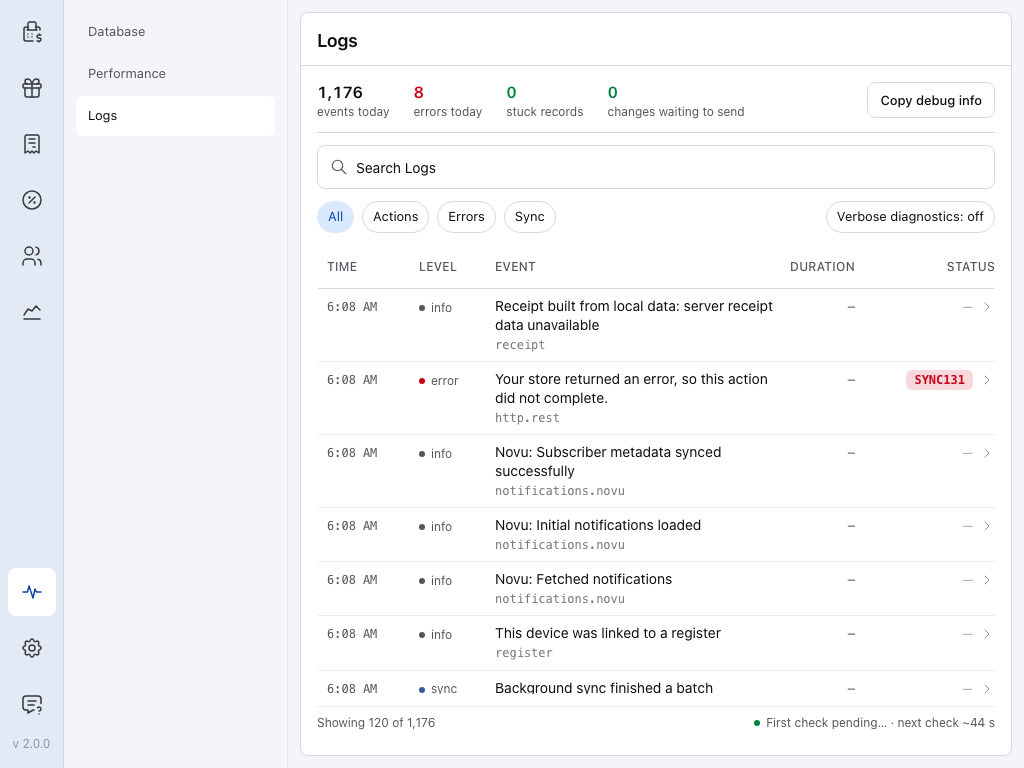
- Store health — the heartbeat in the menu. See Store Health.
- Logs — what the POS has done and what went wrong. See Logs.
- errors today — tap it to show only the errors.
- Copy debug info — copies the details support needs about your POS and its latest errors.
- Search Logs — find a row by the words in it.
- Errors — the same filter as errors today.
- Verbose diagnostics — records extra detail. Turn it on only when someone helping you asks; it switches itself off after 24 hours.
Ready? Go back to Ask from the POS, sign in, and paste your debug info with your question.
More about Logs
The debug info holds your app, WordPress, WooCommerce and WCPOS versions, the store, the connection, changes waiting to send, stuck records and the latest errors.
Open a row to see its detail. Copy takes just that entry, and Help — CODE opens the error code page that explains it. The Logs page explains the filters and Verbose diagnostics in full.
Your versions at a glance
Check versions in About WCPOS
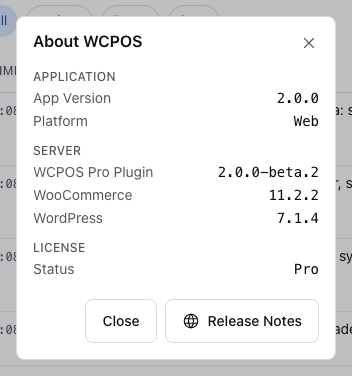
Tap the version number at the very foot of the menu (v 2.0.0 on a tablet, Version 2.0.0 on a phone). About WCPOS lists the app version and platform, the WCPOS plugin, WooCommerce and WordPress versions on your store, and whether the licence is Pro. Release Notes opens updates.wcpos.com in your browser.
Where to ask
- Discord — how-to questions, bugs and ideas. Answers stay where the next person can find them. wcpos.com/discord
- The ask box at wcpos.com/support — type a question and get an answer drawn from the WCPOS documentation, with links. When it can't answer, it points you to Discord.
- Email support@wcpos.com — licences, billing, refunds, and anything you'd rather not post in public.
Priority support is in the Pro channels on Discord. Your licence also funds the development of WCPOS, free and Pro. See Pro License.
Connect Discord for Pro support
- In your wcpos.com account, press Connect Discord on your licence. Or, in the Discord server, type
/linkwith your licence key. - The Pro channels open for your Discord account while the licence is active. They close when it expires, and open again when you renew.
Each licence has seats for up to five people.
Before you ask
Many answers are a search away:
- Not sure WCPOS fits your store yet? — install the free plugin and try it for a few days first. It answers most "can it do this?" questions.
- An error code on screen — look it up in Error Codes.
- Products, orders or customers missing or out of date — check Store health → Database. See Store Health.
- The POS won't load, or shows old data — see Clear Local Data, then Plugin Conflicts and Cloudflare.
- The POS is slow — see Performance.
- Totals differ from WooCommerce — see Totals Disagree.
- Someone may have asked already — search the Discord before you post.
If something goes wrong
The Support screen stays blank. The Discord needs an internet connection. Check the connection, or open wcpos.com/discord in a browser.
"Couldn't copy debug info". The copy didn't reach your clipboard. Click into the POS window and press Copy debug info again, or take a screenshot of the Logs screen instead.
Help improve WCPOS
WCPOS is open source. You can:
- report bugs in Discord or on GitHub,
- suggest features in Discord,
- answer other store owners' questions in general on Discord,
- improve a translation of the app or these docs. See Contributing Translations.